Panasonic Lumix Fz1000
I bought my first really good bridge camera to take holiday photos, focusing on fast optics, a large sensor, weather resistance and 4K capability.
The camera
The Lumix Fz1000 is a bridge camera, which means that the lens is permanently attached to the camera body and cannot be replaced. This is not a disadvantage, as the lens is image-stabilised, has a 25-400 mm, 1:2.8-1:4.0 zoom and is weatherproof. The sensor is 1" in size and is also stabilised, which, in combination with the stabilised lens, enables very sharp images, even when moving. This allowed me to take great photos while walking, from the car and even at night without a tripod while on holiday. With a little practice, the good image stabilisation allows you to produce gimbal-like shots. Thanks to its good photo/video performance and low weight of 780g, the camera is not a big extra weight and can easily be stored in a belt bag or rucksack. The only negative point is that the camera is quite large. This is necessary in order to have a fast superzoom, which was the main reason for me buying the camera.
For night shots or bokeh, the lens with an aperture of 2.8 is not ideal, but you can still achieve good results if you know how to do it, and for the current price of around £500, the camera can already do a lot. I am very satisfied with the camera's photo and video performance, even in 2021. I bought the camera in 2015 for £750 and it is currently available for around £400-500, which I think is a fair price.
How I use it
I bought the camera as my travel companion and to capture special moments. The camera has never disappointed me and I am very satisfied with both its photo and video performance. I still use the camera when I'm on the go and need a good zoom, but also want to take wide-angle photos, for example when hiking, where the weather can be a bit rough. Here, I have the advantage of not having to change lenses and risking dirtying the sensor. In addition, the light weight is a great advantage.
I also use the camera as a second camera to my Panasonic Lumix GH5, as I get the same colour representation on both cameras with the Cine-V setting when I use the same white balance. I like to set up the camera on a tripod to get a good overview of the action and record the event in 4K. The only drawback is that the recording limit is 24 minutes, so I have to check the camera regularly to see if it is still recording or if the recording limit or battery has run out.
Advantages/disadvantages
- Quite compact for the zoom performance and size of the sensor
- Lightweight
- Very fast shutter speed
- Very good image stabilisation (lens, sensor and electronic)
- High continuous shooting speed
- 4K 100 M/Bit
- Good autofocus (in video mode only, if set correctly)
- Low-noise RAW photos
- 4k 100 fps 100M/bit without sound
- Video recording limit of 24 minutes
- No 30 fps in standard mode
- No USB charging possible
- Max. aperture ‘only’ 2.8
- Only adequate video autofocus
Switching the European version to NTSC
Since I mainly record my videos for the internet and I find that 30 frames per second look much smoother than 25 fps, I have now switched all my cameras to 30 frames. You can find out more about this in my article: Why I don't film in 24 FPS. Unfortunately, this is not possible in the standard settings of the Lumix Fz1000, as it is an inexpensive camera designed exclusively for the European market (PAL version). However, you can switch the camera by setting it to service mode.
Instead of the 25p and 50p video formats, 23.976p, 29.97p and 59.94p are available after switching – including UHD at 29.97p.
The hack is performed using key combinations alone. No alternative firmware is required. Incidentally, it only works if the required buttons (WB, DISP., AF/AE-LOCK, ISO) still have their original function – i.e. not if they have been reassigned via the custom menu. As far as I have been able to ascertain, the procedure does not affect the manufacturer's warranty – but I cannot vouch for that. Of course, anyone who uses the hack is responsible for any damage themselves.
Unfortunately, there is no simple way to switch the camera back to 50 Hz. This can only be achieved by completely resetting the camera to its factory settings, which also deletes all individual settings (and there can be a lot of these if you have carefully configured the camera for your own needs).
You can avoid having to reset the camera by saving the camera settings before switching, as you can then reload them after the reset. Only the time and, if necessary, the Wi-Fi password need to be reset.
I recommend using a separate SD card to back up the settings. This can also be an older card with a low capacity that you still have lying around unused. In any case, it should be formatted in the camera beforehand.
- Switching the camera to 60 Hz
Switching the camera to 60 Hz1) Set the mode dial to P and switch off the camera.
2) Insert the memory card.
3) Hold down the three buttons WB + DISP. + AF/AE-LOCK while turning on the camera. This will start the camera in service mode.
4) Press the menu button to open the ‘Setup’ menu on page 5. Thanks to service mode, there is now a ‘ROM Backup’ entry here. Select ‘DSC --> SD’ there. Two text files containing the camera settings will be written to the memory card. Do not switch off the camera at this point, as this will deactivate service mode.
6) Press the play button (green playback symbol). Either the last image taken will be displayed or a message stating that the card is empty.
7) Hold down the ISO + AF/AE-LOCK buttons and switch off the camera. When switching off, the display shows a yellow triangle with an exclamation mark (warning symbol). This will happen every time you switch off the camera while the hack is active.
8) After switching back on, the camera will run in 60 Hz mode.
9) It is best to remove the SD card with the settings and save the two text files so that you can reset the camera if necessary.
- Resetting the camera to 50 Hz – step by step
Resetting the camera to 50 Hz – step by step
1) Set the mode dial to P and switch on the camera.
2) Hold down the WB + MENU/SET buttons and turn off the camera. An ‘Initial Settings’ menu will appear with the correct options already selected. To confirm, simply press WB twice in succession.
3) Insert the memory card with the settings files.
4) Switch the camera back on to test it. It should now be in factory settings (prompt to set language and time, etc.).5) Set the camera to P mode and switch it off.
6) Hold down the three buttons WB + DISP. + AF/AE-LOCK while switching on the camera. This will restart the camera in service mode. The messages prompting you to set the clock and language can be temporarily dismissed by pressing the shutter release button halfway.
7) Press the menu button and open the ‘Setup’ menu on page 5. Select the ‘ROM Backup’ entry and then ‘SDALL --> DSC(FORCE)’. The two text files will be read from the memory card.
8) Switch the camera off and then on again. Service mode is now closed and the previous settings are restored. Now all you need to do is reset the time.
Kaufoption
| Beschreibung | Referrallinks |
|---|---|
Panasonic DMC-Fz1000
|
mazon DE |
Panasonic DMC-Fz1000 II
|
mazon DE |
Panasonic DMC-Fz2200
|
mazon DE |
Sony DSC-RX10
Selbst heute im Jahr 2024 ist die Kamera immer noch top und wird um den ursprünglichen Preis verkauft. |
mazon DE |
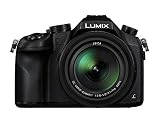 Meine Kamera, der ideale Begleiter für Foto und Video, speziell beim Wandern und Reisen
 Wer mehr Videos als Fotos machen möchte, der findet den idealen Begleiter in der Fz2200 mit eingebautem ND-Filter, V-Log und vielen tollen Funktionen in einem kleine leichten und preiswerten Paket.
 Ja, die Kamera ist schon älter, aber dennoch hat sie kürzlich ein weiteres Softwareupdate bekommen (Stand Jänner 2020). Die Hardware ist der der Lumix sehr ähnlich, kann aber mit einem schärferen Objektiv von Zeiss und einer Brennweite von punkten. Die Kamera ist sehr gut zum Filmen geeignet, da sie einen guten Phasenautofokus hat. Weiters kann die kamera mit einem etwas weiteren Zoombereich und Touchautofokus überzeugen. Im nachinein wäre diese Kamera die bessere Lösung für mich gewesen, damals wusste ich aber noch nicht, was wirklich wichtig ist und welche Funktionen nur Marketing sind. Ich habe mich damals wegen des doch deutlich höheren Preises gegen die Kamera entschieden, aber im Nachhinein betrachtet, denke ich dass die Kamera wegen meiner starken Nutzung den Preis wert gewesen wäre.
In Projekten eingesetzt